How to manage short links as a team: roles, offboarding and audit logs
How to run short links as a team: shared workspaces, owner/admin/editor/viewer roles, offboarding, audit logs, shared naming rules, approvals, SSO and SCIM.
Key takeaways
- Shared logins hide who changed what and make offboarding impossible; give every person their own account in one shared workspace.
- Use least privilege: most people need the editor role, reviewers and executives need viewer, and only one or two people need admin.
- Keep domains, webhooks and security settings with owners and admins, so a hurried edit cannot break every link on your domain.
- An audit log and per-link history answer the question every team eventually asks: who changed this link, and when?
- Larger organisations should connect single sign-on and SCIM, so people removed in the identity provider lose access automatically.
Short links start as one person’s tool and quietly become team infrastructure. Six months later the campaign links live in three personal accounts, the agency uses its own shortener, nobody knows who changed the destination of the link printed on 20,000 flyers, and the person who set up the custom domain has left. This guide shows how to set up link management so a team can move fast without those surprises.
What is link management for teams?
It is running short links, QR codes and bio pages from one shared workspace where every person has their own sign-in and a role that limits what they can do. The workspace owns the links, domains, campaigns and reports; people come and go.
Done well, team link management gives you five things:
- Attribution: every change is recorded against a real person.
- Least privilege: people can do their job and nothing more.
- Shared standards: one set of domains, UTM rules and campaign folders.
- Clean offboarding: access ends the day someone leaves, and their links keep working.
- Oversight: owners see what changed without asking around.
Why is sharing one login a bad idea?
Because it fails every one of those five. The UK National Cyber Security Centre lists the problems with shared accounts directly: sharing makes it harder to keep information private, makes associating actions with a particular person more complicated, and increases the amount of data lost in a successful attack against the account.
For links specifically, that turns into very practical pain:
| With one shared login | With a team workspace |
|---|---|
| “Who changed this destination?” has no answer | Each change shows who, when, old and new value |
| Someone leaves; you change the password and tell everyone | Remove one member; nobody else is affected |
| Everyone can delete domains and API keys | Only owners and admins touch domains, webhooks and security |
| Two-step sign-in codes go to one person’s phone | Each person has their own two-step sign-in |
| Links in personal accounts disappear with their owner | Links belong to the workspace |
How should you set up roles?
Start from least privilege. NIST’s definition is a good rule of thumb: restrict each user’s access to the minimum necessary to accomplish their assigned tasks. In practice, most people on a marketing team need to create and edit links, and very few need to manage members or billing.
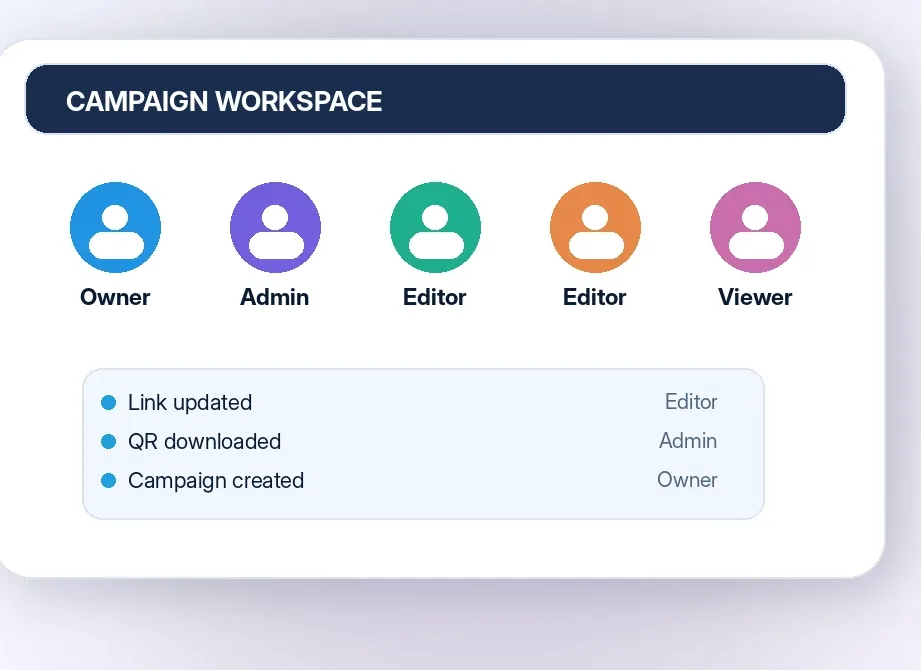
BN Shortener workspaces have four roles:
| Role | Can do |
|---|---|
| Owner | Everything, including billing; the only one who can make or remove admins |
| Admin | Everything except billing; invite and remove members (editor and viewer roles); see pending invitations and the audit log |
| Editor | Create and change links, QR codes, bio pages, campaigns, Launch Check, Link Guardian and the like; cannot change billing, custom domains, webhooks, privacy or security settings, messaging setup or the team |
| Viewer | Read only |
A mapping that works for most teams (illustrative):
| Person | Role | Why |
|---|---|---|
| Head of marketing | Owner | Billing and final say on admins |
| Marketing ops lead | Admin | Manages members and reviews the audit log |
| Campaign and social managers | Editor | Create, tag and fix links daily |
| Agency or freelancer | Editor | Same work, removable in one click |
| Executives, sales, finance | Viewer | Read reports without risk of edits |
Two details matter more than they look. First, editors cannot change custom domains, so nobody can break every link on go.yourbrand.com with a hurried DNS edit. Second, role changes and removals take effect on the person’s next request; they are not cached.
One workspace or several?
Use one workspace per budget and brand boundary. A single company with one brand usually needs one. An agency, or a group with brands that should not see each other’s data, needs one workspace per client or brand.
In BN Shortener every account is a workspace (you can rename it), and a person can belong to many workspaces and switch between them. Their personal sign-in, profile, password, two-step sign-in, sessions and connected apps stay their own. That makes the agency model simple: each client keeps its own workspace, domains and reports, and agency staff are invited with the role they need.
How do you invite people and remove them safely?
Inviting. Owners and admins invite by email with a role (editor by default). The invitation is valid for 7 days; the invitee signs in or creates a free account with the same email address. Invitations can be revoked before they are accepted.
Offboarding. This is where shared logins fail and roles pay off. A simple routine:
- Remove the member from the workspace on their last day (or before, for admins).
- Check the audit log for anything they changed in their final weeks.
- Rotate any API key or webhook secret they had access to. In BN Shortener only the owner creates API keys, which keeps this list short.
- Reassign their open work: campaigns, Link Guardian incidents, pending Launch Check sign-offs.
The links they made stay in the workspace and keep working, because they never belonged to the person. NCSC’s SaaS guidance recommends the same principle at scale: automate the joiner, mover and leaver process where you can, and where you cannot, review access periodically and revoke what is unnecessary.
Who changed this link? Audit logs and history
Every team eventually asks it. Two records answer it:
- Per-link history: every field change with the old value, new value, who and when, and one-click rollback per field. A rolled-back destination is re-scanned and re-checked.
- The workspace audit log (Business and Enterprise): visible to the owner and admins, filterable by date, action and person, and exportable as CSV or NDJSON (up to 100,000 rows). It covers sign-ins, two-step changes, link and QR changes, API keys, domains, webhooks, team changes and bulk operations. Enterprise can also pull it into a SIEM through the API.
Owners also get a daily team activity digest by email listing what each member created, edited or deleted, and nothing on quiet days. NCSC’s advice for SaaS is to make sure activity logging is enabled and retained; for links, this is the easy version.
How do you keep a team’s links consistent?
Roles stop accidents. Shared standards stop drift. Set these once at workspace level:
- Domains. One or a few branded domains everyone uses; see use your own domain for short links.
- UTM naming rules. Allowed values, preferred spellings and lowercase for each UTM parameter, so
fbgets flagged asfacebookbefore sending. Our UTM naming conventions guide has a template. - Campaigns (Pro and higher), which can be nested, each with a default domain, a UTM preset and pixels, so a new link in a campaign starts with the right settings, plus link folders (every plan) to keep My Links tidy.
- Naming and tags. Titles that say what the link is, tags for team or channel.
- A pre-send check with sign-off. Launch Check runs automatically on new links. A reviewer can sign off the latest result with a note; a “Not ready” result can only be signed off with an explicit override and a note of at least 10 characters. The sign-off lapses when the destination changes, so an approval always matches what is live.
The general rules for good links apply to every member; the short link best practices checklist is a good onboarding read.
How do you secure team accounts?
Personal accounts make real security possible. Turn on two-step sign-in for everyone. CISA’s guidance is blunt: users who enable multifactor authentication are significantly less likely to get hacked, and any MFA is better than none.
BN Shortener supports two-step sign-in by email code or an authenticator app (with 10 single-use recovery codes). Each person can see their active sessions and sign out other devices, and a password change signs out the other devices. API keys carry their own permissions (read, write, delete, webhooks, admin), and API access can be limited to IP ranges or countries, so an integration gets only what it needs.
When do you need SSO and SCIM?
Once your people are managed in an identity provider, access to links should follow it. BN Shortener Enterprise supports:
- Single sign-on with OpenID Connect and SAML 2.0, for standard identity providers such as Okta and Microsoft Entra ID. You verify your email domain with a DNS TXT record.
- Just-in-time provisioning (on by default): people from your verified domains get a seat with a default role, editor unless you choose otherwise, on their first SSO sign-in.
- Require SSO to turn off password sign-in for those domains, while the workspace owner keeps password sign-in as a break-glass path.
- SCIM 2.0, built to the standard for Microsoft Entra ID and Okta, to create, update and deactivate users. Deactivating someone removes the membership at once.
- 12-hour SSO sessions, so people removed in the identity provider lose access the same day.
NCSC recommends exactly this pattern for SaaS: favour SSO using standards such as OpenID Connect and SAML, and automate the user lifecycle with tooling such as SCIM.
Which plan fits your team?
| Team | What you need | BN Shortener plan |
|---|---|---|
| One person, or a founder with a freelancer | One seat, link history, Launch Check | Free (or Pro for more links, private links and Link Guardian) |
| A small marketing team | Up to 5 seats with roles, audit log, more domains | Business: 5 seats, audit log, 10 custom domains |
| An agency with clients | A workspace per client, reports clients can see | Business: agency mode with 10 client workspaces; Enterprise: unlimited |
| A larger organisation or agency group | Unlimited seats, SSO, SCIM, audit log export to a SIEM | Enterprise (custom) |
See pricing for the full list. Plan limits only restrict creating new items, so links you already made keep working after any change of plan.
Team link governance checklist
- Every person has their own account; no shared logins
- One or two owners and admins; everyone else editor or viewer
- Two-step sign-in on for all members
- Branded domains set up and managed only by owners or admins
- UTM naming rules and campaign presets in place
- Launch Check sign-off required for major campaigns
- Audit log reviewed monthly, and on every departure
- Offboarding routine documented (remove, review, rotate keys, reassign)
- Busy links monitored with Link Guardian, with someone named to respond
Start with a workspace your team can grow into
You can set up a workspace, domain and naming rules today and invite the team when you are ready. Start free at b1.lc. For 5 seats, the audit log and agency mode, choose Business ($49 a month); for SSO, SCIM and unlimited seats, talk to sales about Enterprise. See all team features on the Teams, SSO and SCIM page.
Sources
- Using Software as a Service (SaaS) securely, UK National Cyber Security Centre, 2023-06-07. Checked 2026-10-23.
- Using online services safely: creating separate user accounts, UK National Cyber Security Centre, 2024-01-11. Checked 2026-10-23.
- Least privilege (glossary), NIST Computer Security Resource Center, undated. Checked 2026-10-23.
- More than a password (multifactor authentication), CISA, undated (archived content). Checked 2026-10-23.