
Team workspaces with roles, an audit log, SSO and SCIM
Everyone on the team works in one workspace, with links, QR codes and bio pages in one place. Roles decide who can change what, the audit log records who did it, and on Enterprise your identity provider decides who gets in.
Updated
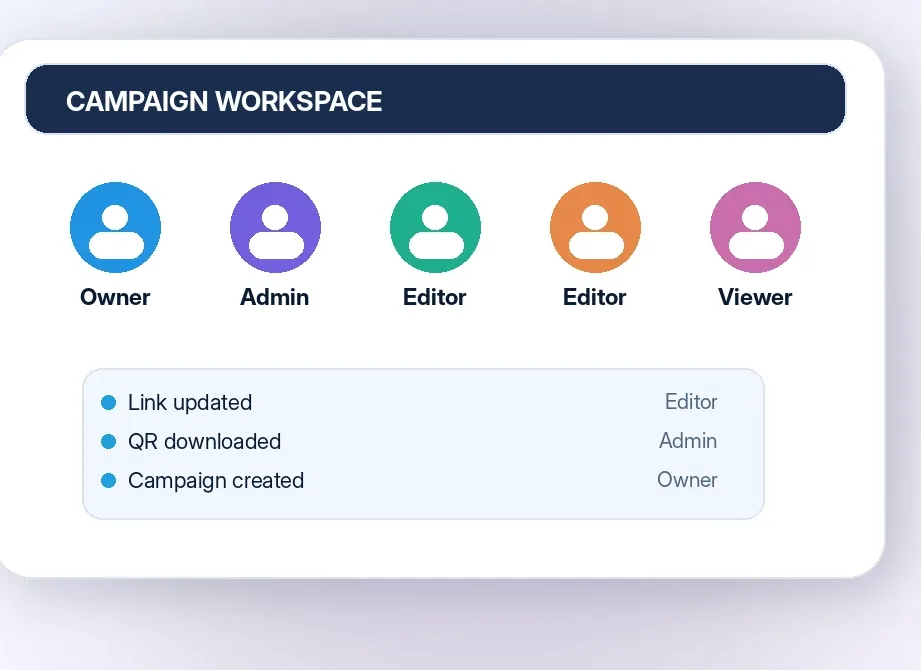
Owner, admin, editor and viewer, with changes applied on the very next request.
Who did what and when, with before and after values. Business and Enterprise.
SAML 2.0 or OpenID Connect with standard providers such as Okta and Microsoft Entra ID.
Create, update and deactivate members from your identity provider. Enterprise.
How do team workspaces work?
Every account is a workspace, named after its owner by default (for example "Sam's workspace") and easy to rename. A person can belong to several workspaces and switch between them with the workspace switcher, while their own sign-in, password, two-step sign-in, sessions and connected apps stay theirs. An agency can work in each client's workspace without sharing a password, or run client workspaces on its own plan with agency mode (below); the guide link management for teams covers how to set one up.
Invite people by email with a role (editor by default). The invitation is valid for 7 days; the invitee signs in, or creates a free account with the same email address, to join. Invitations can be revoked and members can leave. Every action is recorded under the real person who did it, including "created by" on each link.
What can each role do?
Role changes and removals take effect on the next request; they are not cached, so a removed member loses access straight away.
| Role | Can do | Cannot do |
|---|---|---|
| Owner | Everything, including billing; the only one who can make or remove admins | — |
| Admin | Everything except billing; invite and remove editors and viewers; see pending invitations and the audit log | Billing; make or remove admins |
| Editor | Create and change links, QR codes, bio pages, campaigns, Launch Check, Link Guardian and the like | Billing, custom domains, webhooks, privacy and security settings, messaging setup, the team |
| Viewer | Read only | Any change |
What does the audit log record?
The audit log, on Business and Enterprise, is visible to the workspace owner and admins, newest first, with filters for date range, action and person. Each entry carries the time, person, action, resource, IP address and before/after details. Audit log export and the SIEM API are listed on Enterprise: export up to 100,000 rows as CSV or NDJSON, or let your security tools pull entries through API v3 with an admin key.
Workspace owners also get a daily team activity digest by email, listing what each member created, edited or deleted. Nothing is sent on quiet days, and it can be switched off.
- Sign-ins (success, failure, sign-out), password changes, two-step sign-in on and off, recovery code use.
- Links and QR codes created, updated, deleted, archived or restored; bulk operations.
- API keys created, rotated or revoked; IP allow and deny lists; webhooks.
- Custom domains added, verified, SSL activated or deleted.
- Team invitations, members added by invitation or SSO, role changes, removals.
- SSO configuration and domains, SCIM tokens, connected apps, settings changes.
How does agency mode work for client workspaces?
On Business and Enterprise an agency can create client workspaces of its own: Business includes 10, Enterprise unlimited. Each client gets its own links, QR codes, bio pages and reports, kept apart from the others.
- Client workspaces run on the agency's plan, and their usage is counted together with the agency's.
- Client staff are invited as read-only viewers, so they can see their reports without changing anything.
- The agency stays admin of every client workspace.
- For a client's links kept inside the agency's own workspace, use link folders instead.
How does single sign-on work?
On Enterprise, the owner sets up SSO on the Team page with OpenID Connect or SAML 2.0. It works with standard identity providers such as Okta and Microsoft Entra ID. You verify at least one company email domain with a DNS TXT record; public mailbox domains such as Gmail or Outlook cannot be claimed. For OIDC you enter the issuer URL, client ID and client secret (stored encrypted); for SAML you paste the identity provider's metadata, and BN Shortener gives you its SP metadata and ACS URL.
With just-in-time provisioning (on by default), people from your verified domains get an account and a seat with the default role on their first SSO sign-in. Require SSO turns off password sign-in for those domains, while the owner keeps a password as a break-glass path. SSO sessions last 12 hours, so people removed in the identity provider lose access the same day.
What does SCIM provisioning add?
SCIM provisioning is built to the SCIM 2.0 standard for Microsoft Entra ID and Okta, so your identity provider can manage membership for you. Point it at the SCIM base URL https://b1.lc/api/scim/v2 with a bearer token created on the Team page (up to 5 active, each shown once).
- Users can be created, read, updated, patched, deactivated and deleted.
- Roles come from the roles attribute: admin, editor or viewer. Groups are not used.
- Only emails in your SSO-verified domains can be provisioned, and each active user takes a seat.
- Deactivating or deleting someone removes their membership at once; accounts created by SCIM are switched off and signed out everywhere.
- The workspace owner is never managed through SCIM. Setup guide: SCIM guide.
How to set it up
- Open the Team page
In the dashboard, open Team and rename the workspace if you like.
- Invite people
Invite each person by email as admin, editor or viewer. They have 7 days to accept.
- Review the audit log
On Business and Enterprise, owners and admins filter the audit log by date, action or person. On Enterprise, export it or connect your SIEM.
- Turn on single sign-on
On Enterprise, the owner verifies the company domain with a DNS TXT record and connects the identity provider with OIDC or SAML 2.0.
- Connect SCIM
Create a SCIM token on the Team page and add the base URL and token to Microsoft Entra ID or Okta.
Limits by plan
| Free | Pro | Business | Enterprise | |
|---|---|---|---|---|
| Team seats | 1 | 1 | 5 | Unlimited |
| Roles (owner, admin, editor, viewer) | — | — | Yes | Yes |
| Team audit log | — | — | Yes | Yes |
| Client workspaces (agency mode) | — | — | 10 | Unlimited |
| Audit log export & SIEM API | — | — | — | Yes |
| SSO (SAML, OIDC) and SCIM | — | — | — | Yes |
Prices and every plan's limits are on the pricing page. Limits only restrict creating new items: what you already made keeps working.
Frequently asked questions
Still unsure? Ask us at sales@shortlen.com.
How many people can join a workspace?
Business includes 5 seats with roles, and Enterprise unlimited seats. Free and Pro have 1 seat. Seats count the owner, members and pending invitations. See pricing for every limit.
Can an editor change our custom domains or billing?
No. Editors create and change links, QR codes, bio pages, campaigns and monitoring, but cannot change billing, custom domains, webhooks, privacy or security settings, messaging setup or the team.
Can one person work in several workspaces?
Yes. A person can belong to many workspaces and switch between them. Their sign-in, password, two-step sign-in and sessions stay their own.
Which identity providers work with SSO?
Standard SAML 2.0 or OpenID Connect providers, such as Okta and Microsoft Entra ID; SCIM provisioning is built for Microsoft Entra ID and Okta. SSO is part of Enterprise; talk to sales to set it up.
What happens when someone leaves the company?
With SCIM, deactivating them in your identity provider removes their membership at once and signs out accounts created by SCIM everywhere. With SSO alone, sessions last 12 hours, so they lose access the same day.
Can an agency manage several clients?
Yes. Agency mode on Business includes 10 client workspaces, and Enterprise unlimited. They run on the agency's plan with usage counted together; client staff are read-only viewers and the agency stays admin.
Can we stop people signing in with a password?
Yes. Require SSO turns off password sign-in for your verified domains. The workspace owner keeps password sign-in as a break-glass path.
Can our SIEM read the audit log?
Yes, on Enterprise. Audit log export and the SIEM API let your security tools pull entries through API v3 with an admin key.
Works well with
Guides
Try teams, SSO & SCIM today
The Free plan includes a custom domain, 5 dynamic QR codes, a bio page and click analytics. No credit card.