
QR code minimum size for print in mm, inches and pixels, with a size chart
QR code minimum size for print in mm, inches and pixels: the 20 mm floor, the 10:1 rule, a size chart from cards to billboards, and why short links help.
Key takeaways
- 2 x 2 cm (0.8 in) is the practical minimum for print; the 1 x 1 cm floor sometimes quoted is too small for reliable scanning.
- Use the 10:1 rule: code width = scanning distance divided by 10. A poster read from 1 m needs a 10 cm code.
- What really decides scannability is module size, and that depends on how much data the code holds; a short link keeps modules big.
- Leave a quiet zone of 4 modules on every side, and do not count it as part of the code when you measure.
- Print from a vector file (SVG, PDF or EPS), keep dark-on-light contrast, and test the printed proof with two phones at the real distance.
The size of a printed QR code decides whether people scan it or walk past. Too small, and phones struggle to focus; too dense, and modules blur together; too big for a close-up spot, and the code will not fit in the camera frame. This guide gives you the minimum, the distance rule, a size chart by format and the module maths that explains all of it.
What is the minimum size for a printed QR code?
The Nielsen Norman Group, which tested QR code usability, notes that the often-quoted official minimum of 1 x 1 cm (0.4 in) can be too small for reliable scanning and recommends at least 2 x 2 cm (0.8 x 0.8 in). The Deloitte Digital QR generator help centre lands in the same place: a code holding a typical URL should be printed at least 20 x 20 mm when scanned from 20 cm.
Treat 2 cm as the floor for anything a customer scans: business cards, labels, tickets, packaging. Go below it only for codes you control end to end, such as asset labels read by a known scanner, and test them.
QR code minimum size in mm, inches and pixels
The same minimums in every unit people ask for. Widths are the code itself, without the 4-module quiet zone; pixels are for a raster file printed at 300 dpi (width in inches x 300).
| Scanning distance | Minimum width (mm) | Inches | Pixels at 300 dpi |
|---|---|---|---|
| Tested labels only (not for customers) | 10 mm | 0.39 in | 118 px |
| 15-20 cm (practical floor) | 20 mm | 0.79 in | 236 px |
| 25 cm | 25 mm | 0.98 in | 295 px |
| 30 cm | 30 mm | 1.18 in | 354 px |
| 40 cm | 40 mm | 1.57 in | 472 px |
| 50 cm | 50 mm | 1.97 in | 591 px |
| 1 m | 100 mm | 3.94 in | 1,181 px |
| 2 m | 200 mm | 7.87 in | 2,362 px |
| 3 m | 300 mm | 11.81 in | 3,543 px |
The widths follow the 10:1 rule below, with NN/g’s 2 cm floor; the inch and pixel columns are our conversions. A vector file (SVG, PDF or EPS) makes the pixel column unnecessary. For your own distance, data and logo, the free QR code size calculator does the arithmetic.
How big should a QR code be for its scanning distance?
Use the 10:1 rule: the code should be at least one tenth as wide as the distance people scan from. NN/g puts it as adding 1 cm of width for every 10 cm of distance.
Code width = scanning distance / 10
So a code scanned from 50 cm needs to be at least 5 cm wide; one scanned from 3 m needs 30 cm. NN/g adds that codes should be larger in dim lighting, and that people need around 15 seconds to scan a code, which matters for billboards and rotating screens where a short, memorable web address may work better than a code.
QR code size chart by print format
These sizes apply the 10:1 rule to typical scanning distances and round up to the 2 cm minimum. They assume a short link (see the next section) and good contrast; add size for dim light, long URLs or a large logo. The distances are our estimates, labelled illustrative.
| Format | Typical scanning distance (illustrative) | Minimum code width | Comfortable width |
|---|---|---|---|
| Business card | 15-25 cm | 2 cm (0.8 in) | 2.5 cm (1 in) |
| Product label, packaging | 15-30 cm | 2 cm (0.8 in) | 2.5-3 cm (1-1.2 in) |
| Flyer, menu, table tent | 25-40 cm | 3 cm (1.2 in) | 4 cm (1.6 in) |
| Brochure, direct mail | 30-40 cm | 3 cm (1.2 in) | 4 cm (1.6 in) |
| A4 / letter poster at arm’s length | 50 cm | 5 cm (2 in) | 6-7 cm (2.5 in) |
| A3 / tabloid poster on a wall | 1 m | 10 cm (4 in) | 12 cm (5 in) |
| Shop window, roll-up banner | 2 m | 20 cm (8 in) | 25 cm (10 in) |
| Trade-show backdrop | 3 m | 30 cm (12 in) | 40 cm (16 in) |
| Billboard | 10 m | 1 m (3.3 ft) | larger, plus a short URL |
Deloitte’s help centre gives matching worked examples: 20 mm for an A4 magazine read at 20 cm, 100 mm for an A3 poster at 1 m and 1 m for a billboard at 10 m.
The chart answers “how big”, but it rests on an assumption: that your code is not too dense. That is the part most size guides skip.
Why does the amount of data change the size you need?
A QR code is a grid of modules. The more data it holds, the more modules it needs, and at a fixed print size more modules means smaller modules. Small modules are what fail: phones cannot resolve them from a distance, and printing spreads ink into them.
The grid size is the code’s version. DENSO WAVE’s specification runs from version 1 (21 x 21 modules) to version 40 (177 x 177), adding 4 modules per side each step. Here is how many bytes of a web address fit in the small versions at the default error correction level M, and what that means for a 2.5 cm code once the 4-module quiet zone is included:
| Version | Grid | Bytes at level M | Module size in a 2.5 cm code with margin |
|---|---|---|---|
| 2 | 25 x 25 | 26 | 0.76 mm |
| 3 | 29 x 29 | 42 | 0.68 mm |
| 4 | 33 x 33 | 62 | 0.61 mm |
| 6 | 41 x 41 | 106 | 0.51 mm |
| 7 | 45 x 45 | 122 | 0.47 mm |
| 10 | 57 x 57 | 213 | 0.38 mm |
Capacities are from the published QR capacity tables; module sizes are our arithmetic: 25 mm divided by (grid + 8 margin modules).
A dynamic QR code from BN Shortener holds a short address of the form b1.lc/qr/ plus a short code, which fits in version 2 or 3. A long landing page address with five UTM tags easily reaches 120 characters, which needs version 7. At the same 2.5 cm, the long URL’s modules are about 40% smaller. Put the other way: shortening the link lets you print the code smaller with the same reliability, or print it at the same size and have it scan from further away. That is one reason marketers use dynamic QR codes for print.
How do you calculate an exact QR code size?
DENSO WAVE’s own method works from module size up:
- Choose the error correction level (M is the usual default).
- Find the smallest version that holds your data. DENSO WAVE’s example: 50 alphanumeric characters at level M need version 3, because version 2 at level M holds only 38.
- Multiply the grid by the module size. Their example uses a 400 dpi printer with 4 dots per module, which gives 0.254 mm modules: 29 x 0.254 mm = 7.366 mm.
- Add the quiet zone, 4 modules on each side: 7.366 + 8 x 0.254 = 9.398 mm.
That 9.4 mm code is fine for an industrial scanner at close range. For people with phones, flip the method: decide the distance, take the width from the 10:1 rule, then check that the module size in the table above stays comfortable. If the modules come out very small for a code scanned from more than arm’s length, shorten the content or print bigger, and confirm with a test scan from the real distance.
What file format and resolution should you print from?
Print from a vector file whenever you can: SVG for web-to-print and design tools, PDF or EPS for professional printers. Vector edges stay sharp at any size, so a code drawn for a business card can go on a banner unchanged. For a print run with many codes (tickets, labels), create them from a CSV (up to 2,000 rows in BN Shortener) and download them as one ZIP of vector files, with a codes.csv listing each code.
If you must use a raster file (PNG or JPEG), export enough pixels for the final print size at 300 dpi:
| Final width | Pixels needed at 300 dpi |
|---|---|
| 2 cm (0.8 in) | about 240 px |
| 5 cm (2 in) | about 600 px |
| 10 cm (4 in) | about 1,200 px |
| 20 cm (8 in) | about 2,400 px |
Never enlarge a small PNG: the edges blur and modules smear. BN Shortener exports QR codes as PNG, JPEG and WEBP (256 to 2,048 px in the dashboard, up to 4,000 px through the API) and as true vector SVG, PDF and EPS. Its vector files are built from real shapes and sized at 300 dpi; effects that exist only as pixels, such as drop shadows, 3D tilt or a background photo, are left out of vector files, and the dashboard tells you which.
Which design choices change the size you need?
Contrast. NN/g recommends a dark foreground on a light background and warns against inverted (light-on-dark) codes, which some scanners cannot read. Low contrast effectively shrinks the code, because the camera struggles to separate modules.
Logos. A logo covers modules, so you raise error correction to Q (about 25% recoverable) or H (about 30%). Higher levels add modules to the same content, which can push the code up a version. Our logo guide explains how to keep the logo modest.
Quiet zone. DENSO WAVE’s specification requires a 4-module margin on all sides. Do not crop it, frame it tightly or print text into it. When a layout is tight, it is better to shrink the whole code slightly than to eat the margin.
Surface. Glossy lamination causes glare, curved surfaces such as bottles bend the grid, and textured paper or fabric softens edges. Each of these calls for a larger code than the chart suggests, and a test on the real material.
How do you test a QR code before printing?
- Print a proof at 100% scale on the real stock, or as close as you can get. A code that scans on screen can fail on paper.
- Scan with at least two phones, one iPhone and one Android, and if you can an older model.
- Scan from the real distance and angle, not just close up: from the table, from across the room, in the lighting of the venue.
- Check the destination loads fast on mobile and is the right page.
- Check contrast and logo size against the rules above.
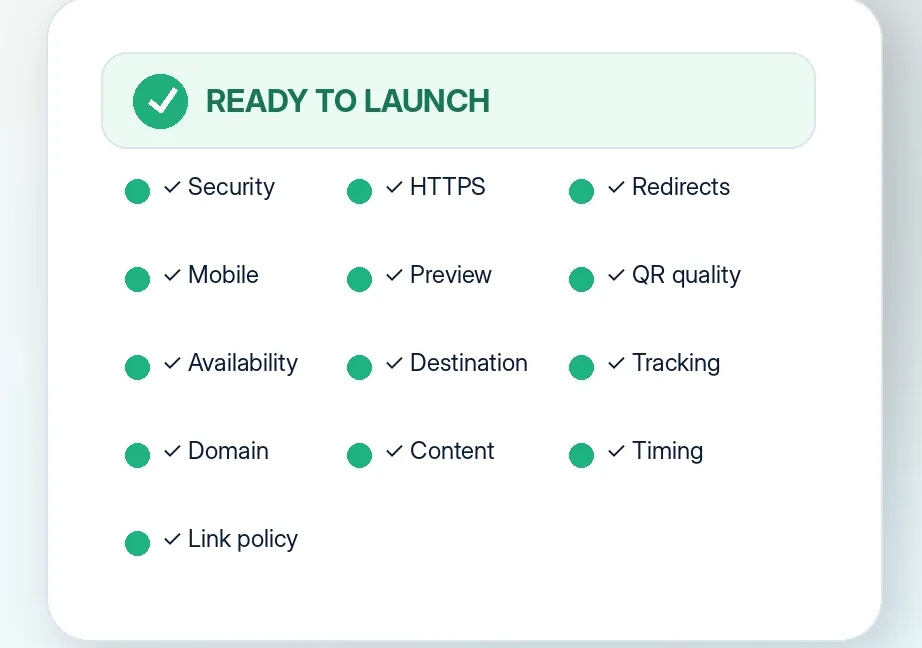
BN Shortener’s Launch Check automates part of this for every QR code that uses a link. Its print-quality check fails a code below 3:1 contrast, warns below 4.5:1, and warns on inverted colours, transparent backgrounds, or a logo larger than 20% of the code with low error correction (L or M). It also tests that the destination is reachable, works on mobile and has valid HTTPS, and it advises a test scan from about 30 cm with two phones.
What about QR codes on product packaging for retail checkout?
Codes that checkout scanners read, such as a QR code carrying a GS1 Digital Link, follow GS1’s sizing rules rather than the marketing chart above. GS1 sets minimum, target and maximum module sizes (the “X-dimension”) for each application, and its support pages explain why the maximum is small: imaging scanners must capture the complete symbol in one image before they can decode it. Take the exact figures from the current GS1 General Specifications or your local GS1 office, and read our GS1 Digital Link QR code guide for how those codes work. BN Shortener supports GS1 Digital Link on short links (/<code>/01/<GTIN>).
Pre-print checklist
- The code is dynamic, so you can fix the destination after printing.
- The encoded link is short (version 2-4 is ideal for print).
- Width is at least distance / 10, and never under 2 cm.
- 4 modules of quiet zone on every side, empty.
- Dark modules on a light background; contrast at least 4.5:1.
- Logo under 20% of the code, with error correction Q or H.
- Vector file (SVG, PDF or EPS) sent to the printer.
- A clear call to action next to the code, such as “Scan for the full menu”. NN/g advises telling people what scanning does and where it leads.
- A 100% proof tested with two phones at the real distance.
Make your next printed code dynamic
A short dynamic link is the easiest way to get a small, reliable code that you can still change after the print run. BN Shortener’s free plan includes 5 dynamic QR codes with scan tracking and SVG, PDF and EPS downloads; start free today at b1.lc, and upgrade to Pro or Business when you need more codes. See the QR code features or read what a QR code is if you are new to them.
Sources
- 13 QR-Code Usability Guidelines, Nielsen Norman Group, 2024-02-09. Checked 2026-10-23.
- Points for setting QR Code symbol size (module size and margin), DENSO WAVE (QRcode.com), undated. Checked 2026-10-23.
- Information capacity and versions of QR Code, DENSO WAVE (QRcode.com), undated. Checked 2026-10-23.
- QR code character capacities by version, Thonky.com, undated. Checked 2026-10-23.
- What is the minimum size of a QR Code?, Deloitte Digital QR Code Generator help centre, undated. Checked 2026-10-23.
- Why is there such a small maximum X-dimension size for GS1 DataMatrix and/or GS1 QR Code?, GS1 support, 2024-09-02. Checked 2026-10-23.