Manage short links with AI assistants: the BN Shortener MCP server
Connect Claude, Claude Code, Cursor or VS Code to the hosted MCP server at b1.lc/mcp and create, check and report on short links by asking in plain language.

Key takeaways
- MCP (Model Context Protocol) is an open standard that lets AI assistants call outside tools; BN Shortener runs a hosted MCP server at https://b1.lc/mcp that you can use today.
- It exposes 28 tools: links, stats, bulk creation, Launch Check, Link Health, URL safety, QR codes, bio pages, campaigns, UTM presets, smart rules, A/B tests and domains.
- You sign in with OAuth and choose the permissions on BN's consent page; every tool call is a normal API call with your plan limits and rate limits.
- Give a reporting assistant read-only access, and keep deletions behind a confirmation; deleted links stay in Trash for 30 days.
- Clients that support remote servers connect directly; clients that only run local servers can use the npm bridge @bn-shortner/shortener-mcp.
You can manage short links by asking an AI assistant in plain language: “Shorten these five URLs for the autumn newsletter and check they are ready to send.” BN Shortener (the service behind Shortlen) runs a hosted MCP server at https://b1.lc/mcp that gives assistants such as Claude, Claude Code, Cursor and VS Code 28 tools for links, QR codes, stats and checks. This guide covers setup, what each tool does, useful prompts and how to keep it safe.
What is MCP, and why use it for links?
The Model Context Protocol is an open standard for connecting AI applications to outside systems. The project’s own analogy is a USB-C port for AI: a server describes its tools once, and any compatible assistant can use them. Claude, ChatGPT, VS Code and Cursor are among the clients that support it.
For link work, that changes three things:
- No context switching. You are already drafting the email or the launch plan in the assistant; the links get made in the same conversation.
- Multi-step jobs in one request. “Create the links, put them in a campaign, run Launch Check, list what failed” is four or five API calls the assistant chains for you.
- Questions instead of dashboards. “Which of my links lost the most clicks this week?” is faster to ask than to filter.
It does not replace the REST API for systems that must run unattended and identically every time. Use MCP where a person is in the loop, the API where nobody is.
How do I connect an AI assistant to BN Shortener?
You need a BN Shortener account (free to start) and an assistant that supports remote MCP servers. The integrations page lists the local bridge and the other connectors.
Claude (claude.ai and the desktop app)
- Open Customize > Connectors, choose + Add, then Add custom connector.
- Name it “BN Shortener” and enter
https://b1.lc/mcp. - Keep sign-in on, add the connector, then connect. Claude opens BN Shortener’s consent page.
- Choose what the assistant may do and approve.
Anthropic’s help article notes that Free Claude accounts are limited to one custom connector, and that on Team and Enterprise an owner adds the connector for the organisation first. Menu names change; follow Anthropic’s current steps if they differ.
Claude Code
claude mcp add --transport http bn-shortener https://b1.lc/mcpThen run /mcp inside Claude Code and follow the browser sign-in. Claude Code stores and refreshes the token. Add --scope user to make the server available in all your projects, or --scope project to share it with your team through a .mcp.json file (each person still signs in with their own account).
Cursor
Add a remote server to ~/.cursor/mcp.json (all projects) or .cursor/mcp.json (one project):
{
  "mcpServers": {
    "bn-shortener": { "url": "https://b1.lc/mcp" }
  }
}
VS Code and other clients
Add a remote server of type http with the URL https://b1.lc/mcp. Clients that cannot complete a browser sign-in can use an API key instead; the MCP page in the BN docs shows how. For clients that only run local (stdio) servers, use the bridge package: npx -y @bn-shortner/shortener-mcp with your API key in BN_API_KEY.
The server speaks streamable HTTP and supports MCP protocol versions 2025-11-25, 2025-06-18 and 2025-03-26, which covers current clients.
What can the assistant do? All 28 tools
Every tool is a normal API call made as you, so plan limits, rate limits and permissions apply exactly as they do in code.
| Area | Tools | Permission |
|---|---|---|
| Links | create_link, list_links, get_link, update_link, archive_link | read / write |
| Links (remove) | delete_link (moves to Trash) | delete |
| Volume | bulk_create_links (up to 100 URLs per call) | write |
| Stats | get_link_stats | read |
| Checks | run_launch_check, get_link_health, check_url_safety | write / read |
| QR codes | create_qr_code, list_qr_codes, get_qr_code_image, get_qr_code_stats | write / read |
| Bio pages | create_bio_page, add_bio_page_link, list_bio_pages | write / read |
| Campaigns and UTM | list_campaigns, create_campaign, add_links_to_campaign, get_campaign_stats, list_utm_presets | read / write |
| Routing and tests | add_smart_rule, start_ab_test, get_ab_test_results | write / read |
| Account | get_account_usage, list_domains | read |
A few details that matter in practice:
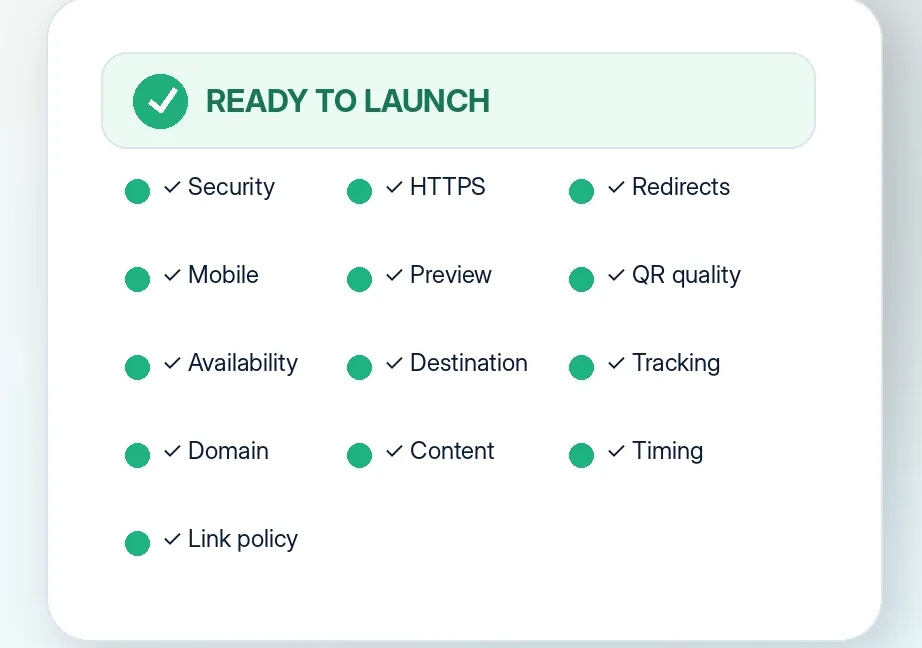
create_linkscans the destination for threats before the link goes live, exactly as the dashboard does.get_link_statscounts people, not bots or link previews, and breaks clicks down by date, country, city, device, browser, referrer, UTM campaign and app opens.run_launch_checkruns BN’s pre-send checks (destination up, redirects, HTTPS, mobile, UTM tags, link previews, QR print quality, security) and returns ready, ready with warnings, or not ready, with what to fix. It shares the limit of 120 checks per hour.get_qr_code_imagereturns PNG to show in the chat or SVG for print.get_link_healthlists links with a problem, most severe first: destination down, blocked or flagged, Launch Check not ready, expiring, busy links without monitoring, links that went quiet.
Prompts that work well
Be specific about names, campaigns and what “done” means. The assistant picks the tools; you check the result.
Launch prep
Shorten these 8 product URLs on go.yourbrand.com, tag them with our “Newsletter” UTM preset, put them in a new campaign called “Autumn 2026”, then run Launch Check on each and list anything that is not ready.
Tools used: list_domains, list_utm_presets, create_campaign, bulk_create_links, add_links_to_campaign, run_launch_check.
Weekly reporting
Compare clicks for the “Autumn 2026” campaign this week with last week. Which three links grew most, and which countries drove the growth?
Tools used: get_campaign_stats, get_link_stats.
Clean-up
Show me every link that needs attention. For any link expiring this week, tell me its clicks in the last 30 days so I can decide whether to extend it.
Tools used: get_link_health, get_link_stats.
Print materials
Create a dynamic QR code for b1.lc/AbC9 named “Store window poster” and give me the SVG.
Tools used: create_qr_code, get_qr_code_image.
Testing and routing
Start an A/B test on the spring-sale link between the current page and
https://example.com/spring-b. Also send visitors from mobile devices on that link tohttps://example.com/spring-mobile.
Tools used: start_ab_test, add_smart_rule. Smart rules and A/B tests are Pro features in the published price list.
Before you share any URL
Is
https://example-offer.net/claimsafe to send to customers?
Tool used: check_url_safety, which scans without creating a link.
If your tags are messy, sort the naming out first; an assistant will happily repeat whatever spelling it sees. Our guide to UTM naming conventions has a starter set.
How do I keep an AI assistant from making a mess?
An assistant with write access can do in seconds what would take you an hour, including the wrong thing. The MCP project’s own security guidance and Anthropic’s connector guidance agree on the basics: connect only trusted servers, grant the least access that does the job, and review tool calls. Applied to links:
- Choose permissions per assistant. BN’s consent page offers read, write, delete and webhooks; assistants never get admin. A reporting assistant needs only read. A launch helper needs read + write. Grant delete only if you really want the assistant to remove links.
- Do not “Allow always” for deletions.
delete_linkmoves a link to Trash: visitors get “not found” at once. You can restore it from Trash for 30 days, but the outage in between is real. - Watch for prompt injection. If you ask an assistant to read a web page or email and then act on your links, text in that content could try to steer it. Keep write tools off during open-ended research, and read the tool call before approving it.
- Use the history. Every change made through MCP is a normal API change: it appears in the link’s history (with per-field rollback) and, on Business and Enterprise, in the team audit log.
- Disconnect when you are done. Settings > Security > Connected Apps lists every assistant connected to your account. Removing one ends its access.
- Mind your limits. Plan limits (for example 100 new links a month on Free) apply to the assistant’s calls too;
get_account_usagetells it, and you, what is left.
MCP, API, CLI or dashboard: which should you use?
| You want to… | Best tool |
|---|---|
| Ask questions and run one-off, multi-step jobs | MCP in your assistant |
| Run the same job on a schedule or inside your product | REST API |
| Script from a terminal or CI job | bn command line (download at b1.lc/cli/bn) |
| Shorten hundreds of links from a spreadsheet | Import or bulk create; see bulk shortening from a CSV |
| Design a QR code or a bio page visually | Dashboard |
They all use the same account and the same rules, so you can mix them: create links with the API, ask the assistant about them on Monday, fix one in the dashboard.
Try it
The MCP server, the API and the bn command line are usable today on every plan, Free included. Create a free account at b1.lc, add https://b1.lc/mcp to your assistant and ask it to shorten your first link. For everything else developers can use, see the developer platform; pricing lists what each plan includes.
Sources
- AI assistants (MCP), BN Shortener developer docs, undated. Checked 2026-10-23.
- What is the Model Context Protocol (MCP)?, Model Context Protocol, undated. Checked 2026-10-23.
- Security Best Practices, Model Context Protocol, 2026-07-28 (specification version). Checked 2026-10-23.
- Connect Claude Code to tools via MCP, Anthropic (Claude Code docs), undated. Checked 2026-10-23.
- Getting started with custom connectors using remote MCP, Anthropic (Claude Help Center), undated ("updated over 3 weeks ago"). Checked 2026-10-23.
- Model Context Protocol (MCP), Cursor docs, undated. Checked 2026-10-23.
- Building MCP servers for ChatGPT and API integrations, OpenAI developer docs, undated. Checked 2026-10-23.